How to Use Pensend's Trend Scanner Agent: Complete Guide
Step-by-step guide to using Trend Scanner, the agent that detects LinkedIn trends by sector and gives you 6 ready-to-publish topic ideas.
Trend Scanner is the first agent in Pensend's 3-step workflow. Its job is specific: detect what's generating conversation on LinkedIn in your sector and return 6 topics with editorial angles and heat levels, ready to write about.
This guide walks you through how to use it step by step.
What Trend Scanner Actually Does
When you open Trend Scanner, the agent analyzes what's driving traffic and conversation on LinkedIn right now. Based on the sector you choose and the description you add, it detects 6 trends ranked by relevance, each with:
- A clear title for the topic
- A description of why it's trending
- A suggested editorial angle for your post
- A heat level: High, Medium, or Emerging
The goal is to give you a starting point so you're never starting from scratch. One click takes you directly to the next agent, Deep Writer, to turn that trend into a full post.
Step 1: Choose Your Sector
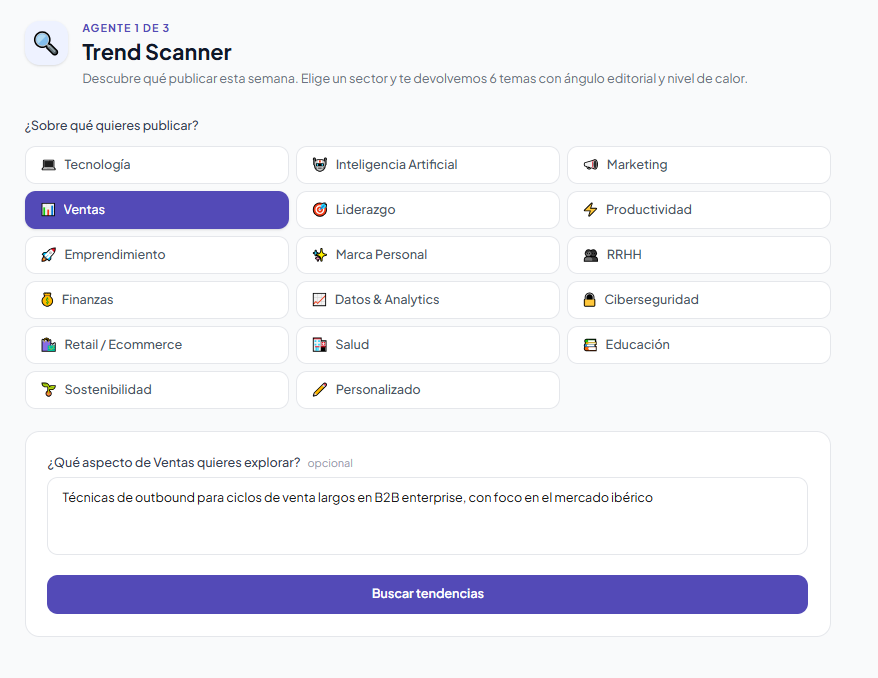
The first step is selecting the sector you want to publish about. Trend Scanner offers 16 predefined sectors and a custom option:
- 💻 Technology — Software, development, infrastructure, and tech tools
- 🤖 Artificial Intelligence — AI, language models, automation, and practical use cases
- 📣 Marketing — Content strategy, branding, advertising, and growth
- 📊 Sales — Sales methodologies, prospecting, and closing
- 🎯 Leadership — Team management, decision-making, and organizational culture
- ⚡ Productivity — Tools, methods, and efficient work habits
- 🚀 Entrepreneurship — Startups, fundraising, and growth stages
- ✨ Personal Brand — Online visibility, positioning, and professional reputation
- 👥 HR — Talent acquisition, employee experience, and people management
- 💰 Finance — Markets, investing, personal and corporate finance
- 📈 Data & Analytics — Business intelligence, visualization, and data-driven decisions
- 🔒 Cybersecurity — Threats, protection, privacy, and compliance
- 🛍️ Retail / Ecommerce — Online commerce, logistics, and shopping experience
- 🏥 Health — Digital health, wellness, and medical technology
- 📚 Education — Training, e-learning, and skill development
- 🌱 Sustainability — ESG, circular economy, and environmental impact
- ✏️ Custom — Define your own niche or specific context
If your sector doesn't fit any of the predefined options, choose Custom. It's the most powerful option when you have a very specific niche.
Step 2: Write a Good Description
After choosing the sector, you can add a description (optional for predefined sectors, required for Custom). This field is where the quality of your results gets decided.
Think of the description as the context you give the agent so it understands what kind of trends are actually relevant to you. The more specific you are, the more concrete and actionable the topics will be.
The base formula for a good description:
[Your specific niche] + [Target audience or market] + [Additional relevant context]
Here are real examples of how to fill this field across different sectors:
Artificial Intelligence:
"Generative AI tools for marketing teams at mid-size companies, focused on content automation and real-world use cases"
Marketing:
"B2B content strategies for growth-stage SaaS companies, especially on LinkedIn and newsletters"
HR:
"Talent management at distributed companies with remote teams across Europe"
Finance:
"Personal finance for professionals aged 30–45, focused on index investing and long-term planning"
Sales:
"Outbound techniques for long B2B enterprise sales cycles, focused on the Iberian market"
The difference between writing "AI stuff" and "generative AI tools for marketing teams" can be the difference between 6 generic topics and 6 topics you can publish this week.
Step 3: Run the Analysis
With your sector chosen and description written, click Scan for trends. The agent will take a few seconds to analyze and return the results.
Step 4: Interpret the Results
Trend Scanner returns exactly 6 trends, ordered from highest to lowest heat. Each card includes the title, a description, and the context for why that topic matters right now.
The three heat levels tell you when to act:
- 🔥 High — topics at peak conversation right now. Publish today and ride the wave.
- 📈 Medium — established trends with an active audience and less saturation than high-heat topics.
- 💡 Emerging — early-stage topics. Less competition, more opportunity if you get there first.
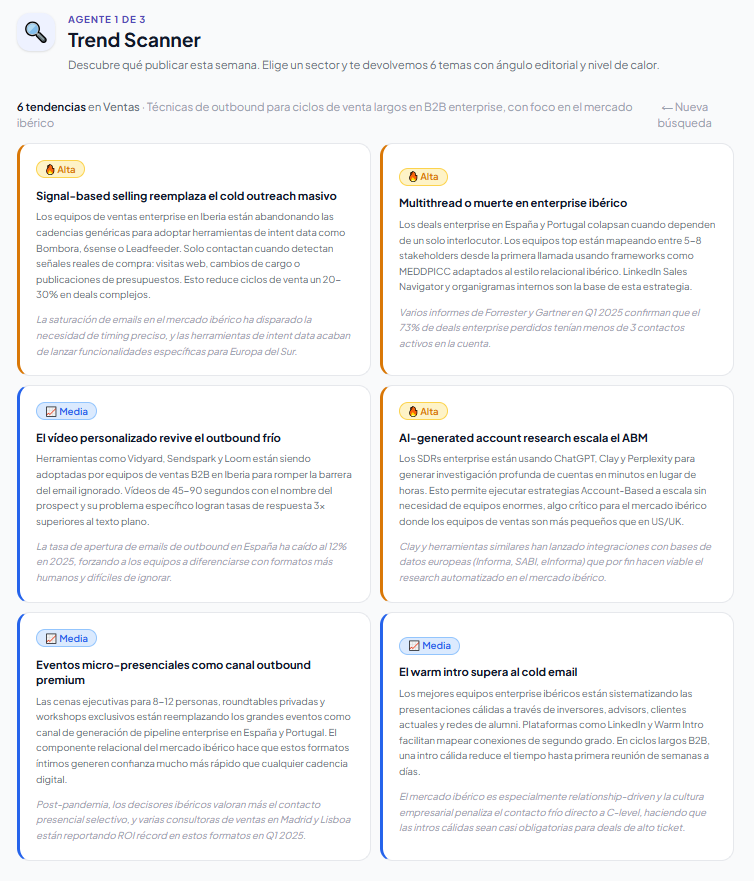
Which one should you pick? High heat isn't always the best choice. An emerging trend where you have deep knowledge can outperform a peak topic where you have nothing new to say. Choose the one that best connects with your perspective and experience.
Click a card to select it. You can change your selection as many times as you want before continuing.
Step 5: Move to Deep Writer
Once you've selected a trend, a fixed button appears at the bottom of the screen: Write about this trend.
Clicking it automatically transfers the topic and editorial angle to the Deep Writer agent, which uses them as a starting point to generate your full post — with your voice, your tone, and your profile.
Trend Scanner is designed to remove the "what do I post today?" question from your weekly routine. In under 30 seconds you have 6 concrete options. The next step is just writing.
Continue reading
Create LinkedIn content in your voice with AI
Trend Scanner, Deep Writer, Slide Writer and Broadcast — four agents, one workflow.
Start for free